Интерактивный расчёт поверхностных систем: различия между версиями
м (Klintsevicho переименовал страницу New в Интерактивный расчёт поверхностных систем) |
Нет описания правки |
||
| Строка 7: | Строка 7: | ||
|p4 =<!--gdy jest kolejny produkt handlowy, zamienić na->"produkt_handlowy3="--> | |p4 =<!--gdy jest kolejny produkt handlowy, zamienić na->"produkt_handlowy3="--> | ||
|category1 =InstalSystem 5#Functionalities | |category1 =InstalSystem 5#Functionalities | ||
|category_name1 = | |category_name1 =ФУНКЦИИ И ИНСТРУМЕНТЫ | ||
|c2 =<!--Jest kategoria -> zamienić na: "category2=" i uzupełnić link do sekcji kategorii na stronie głównej produktu--> | |c2 =<!--Jest kategoria -> zamienić na: "category2=" i uzupełnić link do sekcji kategorii na stronie głównej produktu--> | ||
|category_name2 =<!--podać nazwę kategorii "ZASTOSOWANIE"/"FUNKCJONALNOŚĆ"/...--> | |category_name2 =<!--podać nazwę kategorii "ZASTOSOWANIE"/"FUNKCJONALNOŚĆ"/...--> | ||
|c3 =<!--Jest kategoria -> zamienić na: "category3=" i uzupełnić link do sekcji kategorii na stronie głównej produktu--> | |c3 =<!--Jest kategoria -> zamienić na: "category3=" i uzupełnić link do sekcji kategorii na stronie głównej produktu--> | ||
|category_name3 =<!--podać nazwę kategorii "ZASTOSOWANIE"/"FUNKCJONALNOŚĆ"/...--> | |category_name3 =<!--podać nazwę kategorii "ZASTOSOWANIE"/"FUNKCJONALNOŚĆ"/...--> | ||
|version1 =2022- | |version1 =2022-05-12 | ||
|v2 =<!--Jest wersja -> zamienić na: "version2=" i uzupełnić link do sekcji RN danego produktu--> | |v2 =<!--Jest wersja -> zamienić na: "version2=" i uzupełnić link do sekcji RN danego produktu--> | ||
|v3 =<!--Jest wersja -> zamienić na: "version2=" i uzupełnić link do sekcji RN danego produktu--> | |v3 =<!--Jest wersja -> zamienić na: "version2=" i uzupełnić link do sekcji RN danego produktu--> | ||
Версия от 12:48, 12 мая 2022
| Продукция | InstalSystem 5 |
| Тип статьи | ФУНКЦИИ И ИНСТРУМЕНТЫ |
| Дата перевода | 2022-05-12 |
Description
Интерактивный расчет системы enables fast manual adjustment of selected parameters of a radiant system in given application (Отопление/Охлаждение). In the Интерактивный расчет системы window the following can be adjusted:
- the value of Шаг укладки calculated by the program,
- the value of Разность темп. подача-возврат
- the value of Кол-во контуров.
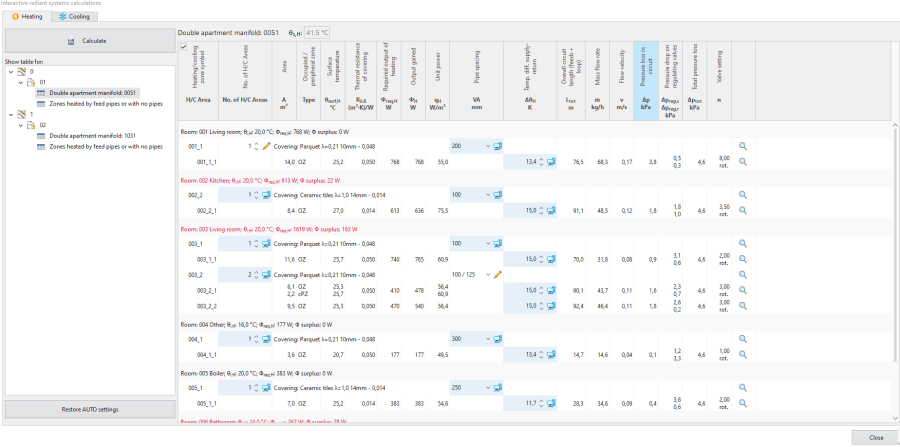
1. Интерактивный расчет системы - tab Отопление 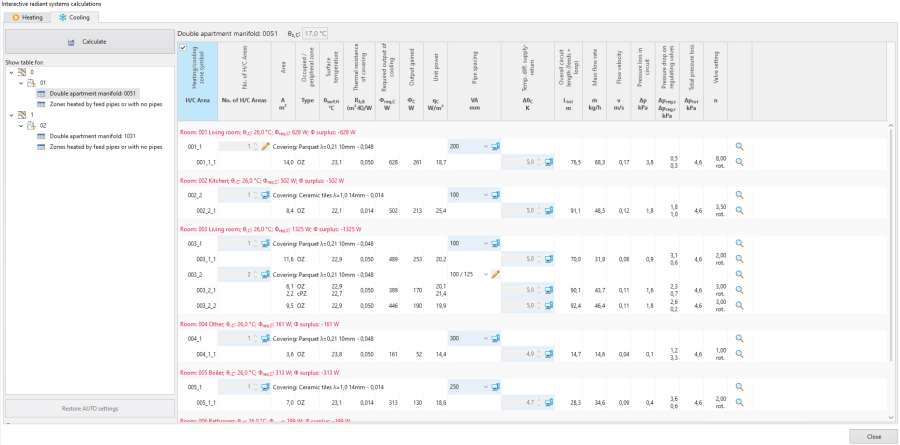
2. Интерактивный расчет системы - tab Охлаждение


After modifying the value of Шаг укладки calculated by the program, only the minimum required set of calculations is made:
- pressure drops in the radiant heating/cooling loops are balanced only in relation to each other across the manifold.
Pressure drops across the manifold balancing valves are calculated during interactive calculations under the assumption that the pressure at the manifold inlet is equal to the required minimum available pressure for this manifold. After final calculations pressure drops are recalculated with flow calculations made for the entire system, as a result the pressure at the manifold often could be higher than the required minimum available pressure.
In the case of the Разность темп. подача-возврат value it is not necessary to click the Расчитать button. After closing Интерактивный расчет системы:
- calculations must be run, as the project has an uncalculated status, which is indicated, for instance, in the status bar:
Внимание! Проект не рассчитан или произведены изменения после предыдущего расчета..
Location in the program
- The Интерактивный расчет системы icon is available in the Основные инструменты bar in section Расчёт.
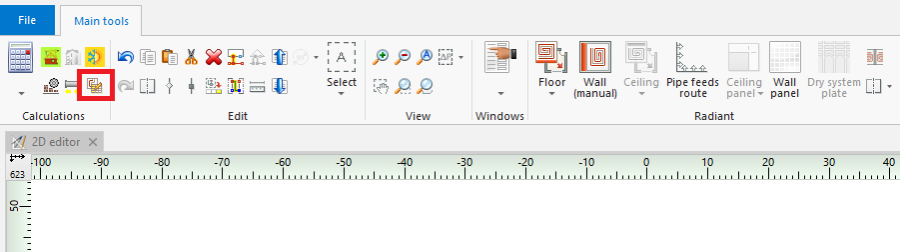
3. Интерактивный расчет системы - Keyboard shortcut: Ctrl + Shift + F10.

Examples of use
Which scopes are available for Интерактивный расчет системы and which windows are editable depends on the selected use of source.
- Отопление use - in the Интерактивный расчет системы window it is possible to modify parameters in the Отопление tab, the Охлаждение tab is empty.
- Мощность отопления и охлаждения use - in the Интерактивный расчет системы window it is possible to modify parameters in the tab Отопление, the Охлаждение tab displays all values, but these cannot be modified.
- Охлаждение use - in the Интерактивный расчет системы window it is possible to modify parameters in the Охлаждение tab, the Отопление tab is empty.
Other possibilities in the Интерактивный расчет системы window
- Filtering Нагр./Охл. зона connected to given manifold.
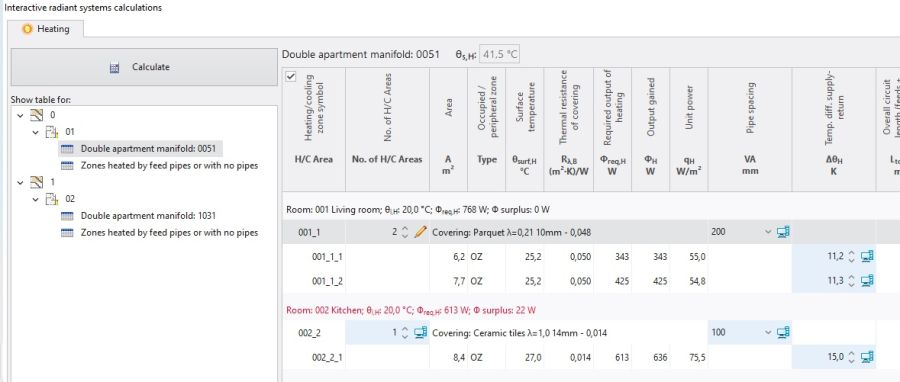
5. Filtering Нагр./Охл. зона connected to given manifold. - Restoration of automatic calculation settings - Восстановить значения АВТО.
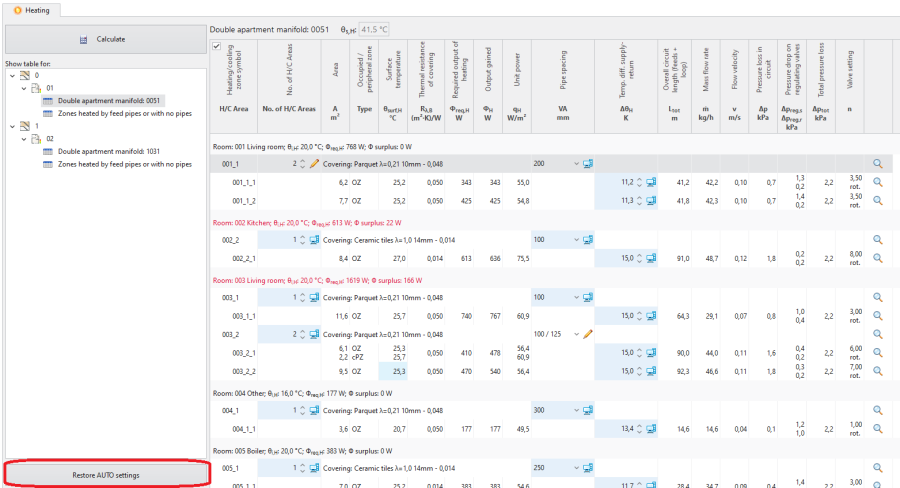
6. Восстановить значения АВТО


Adjustment of the number of Heating/Cooling Areas
- When the number of H/C Areas is changed manually, the default values of Разность темп. подача-возврат (computer status) are restored for all H/C Areas belonging to given H/C Areas Zone.
Adjustment value of Шаг укладки
- As a result of manual adjustment of Шаг укладки the program can change the value of Нагр./Охл. поверхность, but the automatic mode of Нагр./Охл. зона division is not disabled.
Change in the value of Шаг укладки in a single Нагр./Охл. поверхность changes that parameter in all Нагр./Охл. зона elements present within the common Нагр./Охл. зона.
Display of the balancing valve setting and of the covering
- The selected covering is displayed in the Интерактивный расчет системы window.
- The field Настр.клапана is displayed with a value in the Интерактивный расчет системы window.
Adjustment of Разность темп. подача-возврат
- Modification of this value may, among other things, have an effect on the elimination of the diagnostics message:
- скорость потока воды в трубе не обеспечивает самопроизвольного удаления воздуха.
If the Разность темп. подача-возврат value is modified, it is not necessary to click the Расчитать button.
Учитывать vмин for pipes taken from a catalogue that contains Напольная система
In thermal calculations account is taken of the value of minimum flow velocity in a pipe (v_min) from the Floor systems, Wall systems, Ceiling systems tabs. In the AUTO mode the starting value for the selected pipe type is taken from the catalogue that contains Floor systems. The effect of this on the results is shown in the Интерактивный расчет системы tab.
Additional information
The consequence of adjusting parameters in Интерактивный расчет системы is the rejection of the option of optimum supply temperature determination in a radiant system according to the criterion selected in Общие данные:
- теплоотдачи и потерь давления,
- мин.капиталовложений.
This rejection is indicated by the program with diagnostics messages at the hint level:
- с точки зрения теплоотдачи существует более подходящий шаг, чем выбранный вручную,
- С точки зрения стоимости существует более подходящий шаг чем тот, что был выбран вручную,
- С точки зрения гидравлики и теплоотдачи существует более подходящий шаг чем тот, что был выбран вручную.
The list of diagnostics messages in the Интерактивный расчет системы window may differ from that in the Диагностика window. Any adjustments in the design should be based on the list of messages created after calculations are made for the appropriate scope of the design, e.g. Отоп./Охл. системы, that is in the Диагностика window.
Rules of highlighting the fields which are editable in the calculations window:
- Changing a value in a field causes the cell to be highlighted with another colour and presentation of that value.
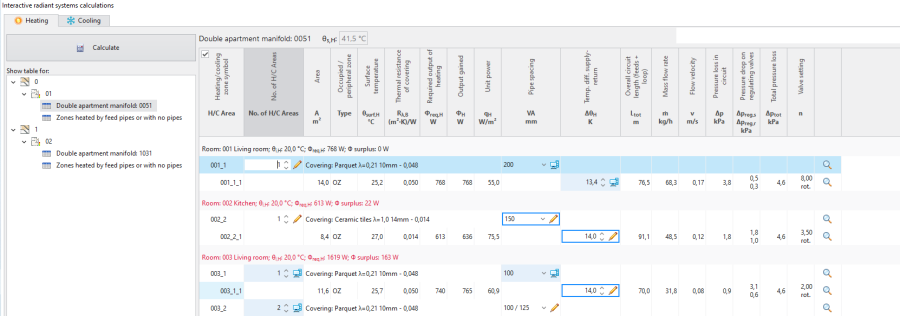
6. Presentation of a field with a manually entered value immediately after editing - No colour highlighting after completed calculation.
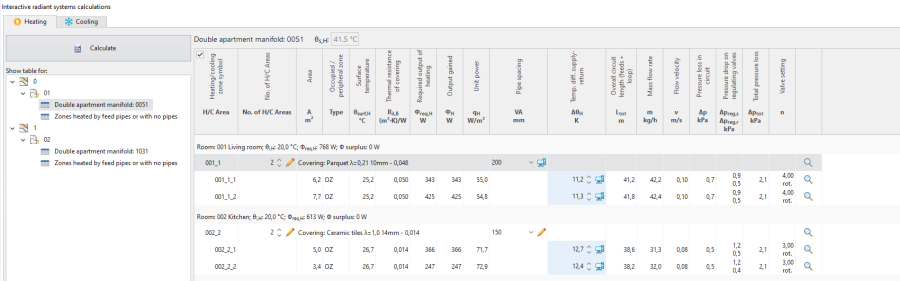
7. Presentation of a field with manually entered value after calculation

