Интерактивный расчёт поверхностных систем: различия между версиями
Нет описания правки |
|||
| Строка 18: | Строка 18: | ||
}} | }} | ||
== | ==Описание== | ||
''<IS_TS id=ShowInteractiveCalculationWindow/>'' | ''<IS_TS id=ShowInteractiveCalculationWindow/>'' обеспечивает быструю ручную настройку выбранных параметров поверхностной системы в конкретных условиях применения (''<IS_TS id=strOgrzewaniePlaszczyznowe/>''/''<IS_TS id=strChlodzeniePlaszczyznowe/>''). | ||
В окне ''<IS_TS id=ShowInteractiveCalculationWindow/>'' можно редактировать следующие параметры: | |||
* | * значение ''<IS_TS id=strVALong/>'', подобранное программой | ||
* | * значение ''<IS_TS id=strDeltaThetaLong/>'' | ||
* | * значение ''<IS_TS id=SPG_LiczbaPodzialowCaption />''.<br clear="all"/>[[File:Interactive radiant system calculations.png|900 px|left|thumb|1. ''<IS_TS id=ShowInteractiveCalculationWindow/>'' - tab ''<IS_TS id=strOgrzewaniePlaszczyznowe/>'']]<br clear="all"/>[[File:Interactive radiant system calculations Cooling.png|900 px|left|thumb|2. ''<IS_TS id=ShowInteractiveCalculationWindow/>'' - tab ''<IS_TS id=strChlodzeniePlaszczyznowe/>'']]<br clear="all"/> | ||
После изменения значения ''<IS_TS id=strVALong/>'', рассчитанного программой, производится только минимально необходимый комплекс расчетов: | |||
* | * перепады давления в контурах поверхностного отопления/охлаждения балансируются только по отношению друг к другу в коллекторе. <br/>Перепады давления на балансировочных клапанах коллектора рассчитываются в ходе интерактивных расчетов при условии, что давление на входе в коллектор равно требуемому минимально допустимому давлению для данного коллектора. После окончательных расчетов перепады давления пересчитываются с расчетом расхода для всей системы, в результате чего давление на коллекторе часто может быть выше, чем требуемое минимально допустимое давление. | ||
В случае, если значение ''<IS_TS id=strDeltaThetaLong/>'' не важно, нажмите кнопку ''<IS_TS id=calculateCaption/>''. | |||
* | После закрытия ''<IS_TS id=ShowInteractiveCalculationWindow/>'': | ||
* необходимо выполнить расчеты, так как проект имеет статус не рассчитанного, что отображается, например, в строке состояния:<br/>''<IS_TS id=CalculationResultsAreOutOfDate/>''.<br/> | |||
{{#ev:youtube|qnTnax5xNGs|900||||rel=0}} <br clear="all"/> | {{#ev:youtube|qnTnax5xNGs|900||||rel=0}} <br clear="all"/> | ||
Версия от 13:21, 12 мая 2022
| Продукция | InstalSystem 5 |
| Тип статьи | ФУНКЦИИ И ИНСТРУМЕНТЫ |
| Дата перевода | 2022-05-12 |
Описание
Интерактивный расчет системы обеспечивает быструю ручную настройку выбранных параметров поверхностной системы в конкретных условиях применения (Отопление/Охлаждение). В окне Интерактивный расчет системы можно редактировать следующие параметры:
- значение Шаг укладки, подобранное программой
- значение Разность темп. подача-возврат
- значение Кол-во контуров.
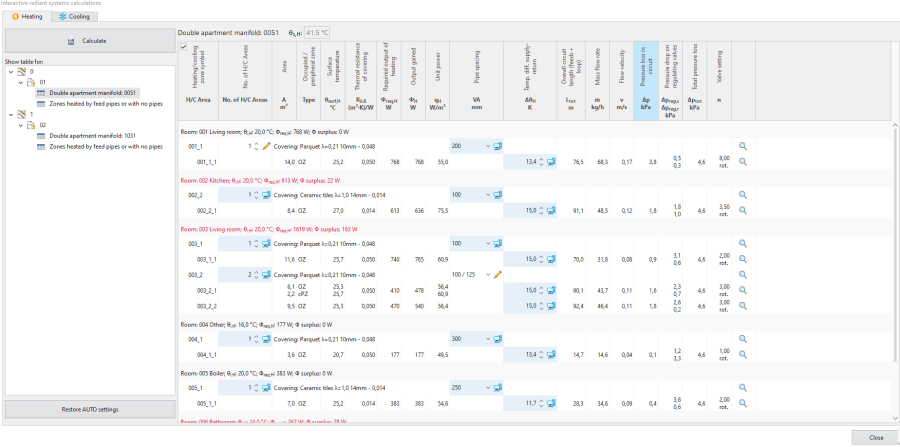
1. Интерактивный расчет системы - tab Отопление 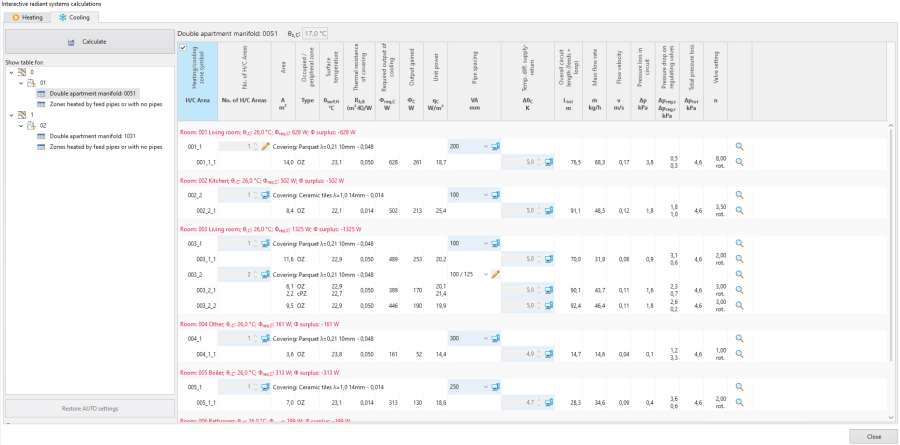
2. Интерактивный расчет системы - tab Охлаждение


После изменения значения Шаг укладки, рассчитанного программой, производится только минимально необходимый комплекс расчетов:
- перепады давления в контурах поверхностного отопления/охлаждения балансируются только по отношению друг к другу в коллекторе.
Перепады давления на балансировочных клапанах коллектора рассчитываются в ходе интерактивных расчетов при условии, что давление на входе в коллектор равно требуемому минимально допустимому давлению для данного коллектора. После окончательных расчетов перепады давления пересчитываются с расчетом расхода для всей системы, в результате чего давление на коллекторе часто может быть выше, чем требуемое минимально допустимое давление.
В случае, если значение Разность темп. подача-возврат не важно, нажмите кнопку Расчитать. После закрытия Интерактивный расчет системы:
- необходимо выполнить расчеты, так как проект имеет статус не рассчитанного, что отображается, например, в строке состояния:
Внимание! Проект не рассчитан или произведены изменения после предыдущего расчета..
Location in the program
- The Интерактивный расчет системы icon is available in the Основные инструменты bar in section Расчёт.
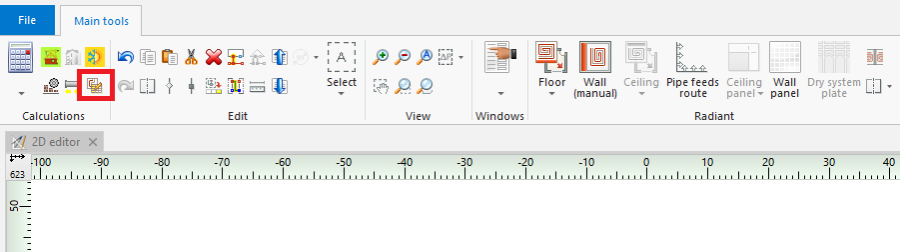
3. Интерактивный расчет системы - Keyboard shortcut: Ctrl + Shift + F10.

Examples of use
Which scopes are available for Интерактивный расчет системы and which windows are editable depends on the selected use of source.
- Отопление use - in the Интерактивный расчет системы window it is possible to modify parameters in the Отопление tab, the Охлаждение tab is empty.
- Мощность отопления и охлаждения use - in the Интерактивный расчет системы window it is possible to modify parameters in the tab Отопление, the Охлаждение tab displays all values, but these cannot be modified.
- Охлаждение use - in the Интерактивный расчет системы window it is possible to modify parameters in the Охлаждение tab, the Отопление tab is empty.
Other possibilities in the Интерактивный расчет системы window
- Filtering Нагр./Охл. зона connected to given manifold.
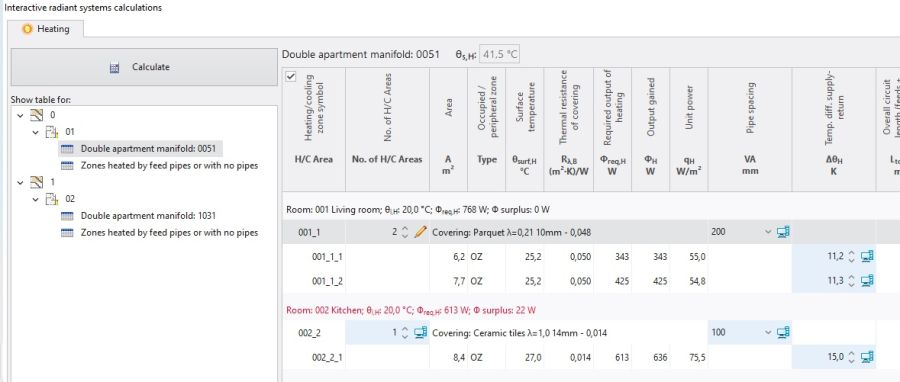
5. Filtering Нагр./Охл. зона connected to given manifold. - Restoration of automatic calculation settings - Восстановить значения АВТО.
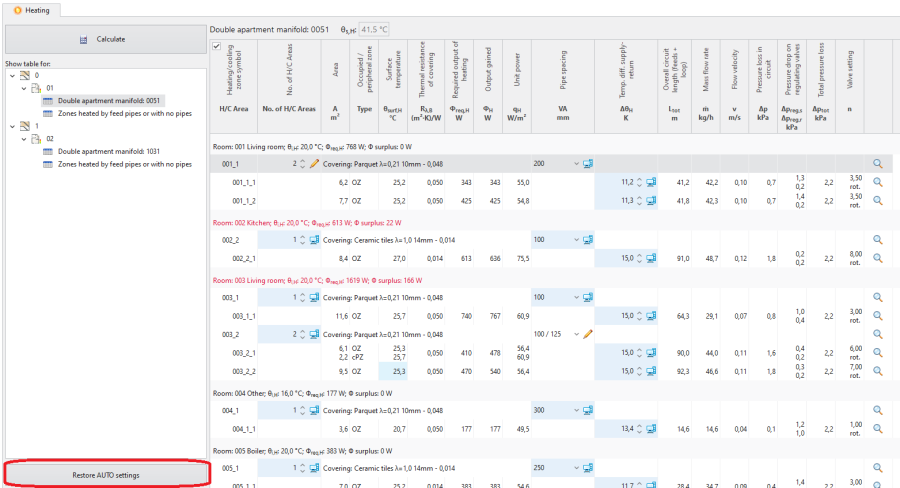
6. Восстановить значения АВТО


Adjustment of the number of Heating/Cooling Areas
- When the number of H/C Areas is changed manually, the default values of Разность темп. подача-возврат (computer status) are restored for all H/C Areas belonging to given H/C Areas Zone.
Adjustment value of Шаг укладки
- As a result of manual adjustment of Шаг укладки the program can change the value of Нагр./Охл. поверхность, but the automatic mode of Нагр./Охл. зона division is not disabled.
Change in the value of Шаг укладки in a single Нагр./Охл. поверхность changes that parameter in all Нагр./Охл. зона elements present within the common Нагр./Охл. зона.
Display of the balancing valve setting and of the covering
- The selected covering is displayed in the Интерактивный расчет системы window.
- The field Настр.клапана is displayed with a value in the Интерактивный расчет системы window.
Adjustment of Разность темп. подача-возврат
- Modification of this value may, among other things, have an effect on the elimination of the diagnostics message:
- скорость потока воды в трубе не обеспечивает самопроизвольного удаления воздуха.
If the Разность темп. подача-возврат value is modified, it is not necessary to click the Расчитать button.
Учитывать vмин for pipes taken from a catalogue that contains Напольная система
In thermal calculations account is taken of the value of minimum flow velocity in a pipe (v_min) from the Floor systems, Wall systems, Ceiling systems tabs. In the AUTO mode the starting value for the selected pipe type is taken from the catalogue that contains Floor systems. The effect of this on the results is shown in the Интерактивный расчет системы tab.
Additional information
The consequence of adjusting parameters in Интерактивный расчет системы is the rejection of the option of optimum supply temperature determination in a radiant system according to the criterion selected in Общие данные:
- теплоотдачи и потерь давления,
- мин.капиталовложений.
This rejection is indicated by the program with diagnostics messages at the hint level:
- с точки зрения теплоотдачи существует более подходящий шаг, чем выбранный вручную,
- С точки зрения стоимости существует более подходящий шаг чем тот, что был выбран вручную,
- С точки зрения гидравлики и теплоотдачи существует более подходящий шаг чем тот, что был выбран вручную.
The list of diagnostics messages in the Интерактивный расчет системы window may differ from that in the Диагностика window. Any adjustments in the design should be based on the list of messages created after calculations are made for the appropriate scope of the design, e.g. Отоп./Охл. системы, that is in the Диагностика window.
Rules of highlighting the fields which are editable in the calculations window:
- Changing a value in a field causes the cell to be highlighted with another colour and presentation of that value.
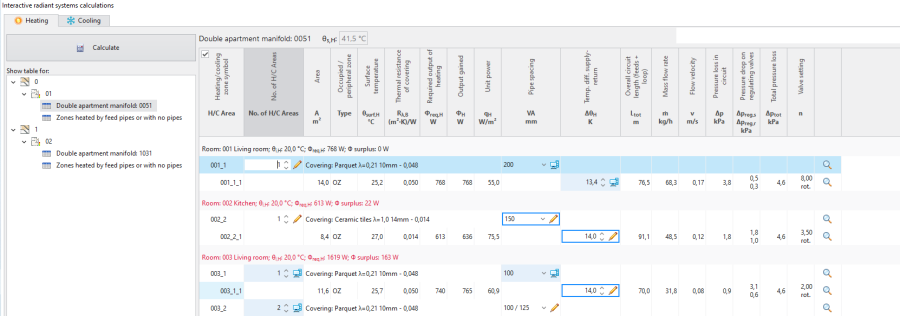
6. Presentation of a field with a manually entered value immediately after editing - No colour highlighting after completed calculation.
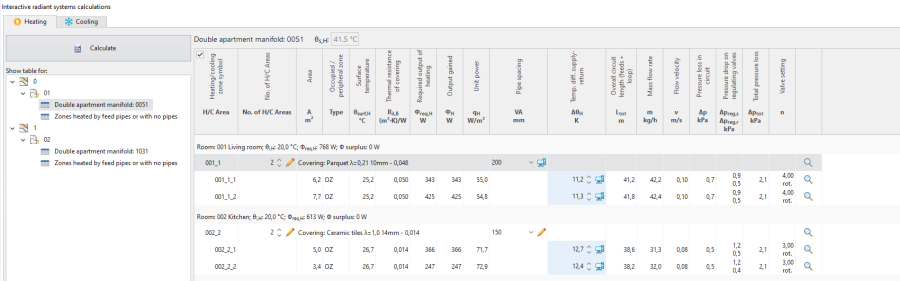
7. Presentation of a field with manually entered value after calculation

